|
|
|
Home | Forums |
Downloads | Gallery |
News & Articles | Resources |
Jobs | FAQ |
| Join |
Welcome !
|
3 Users Online (1 Members):
Show Users Online
- Most ever was 626 - Mon, Jan 12, 2015 at 2:00:17 PM |
Forums
|
Forums >> Revit Building >> Technical Support >> Section Cut Fill Patterns Black
|
|
|
active
Joined: Tue, Aug 28, 2007
8 Posts
No Rating |
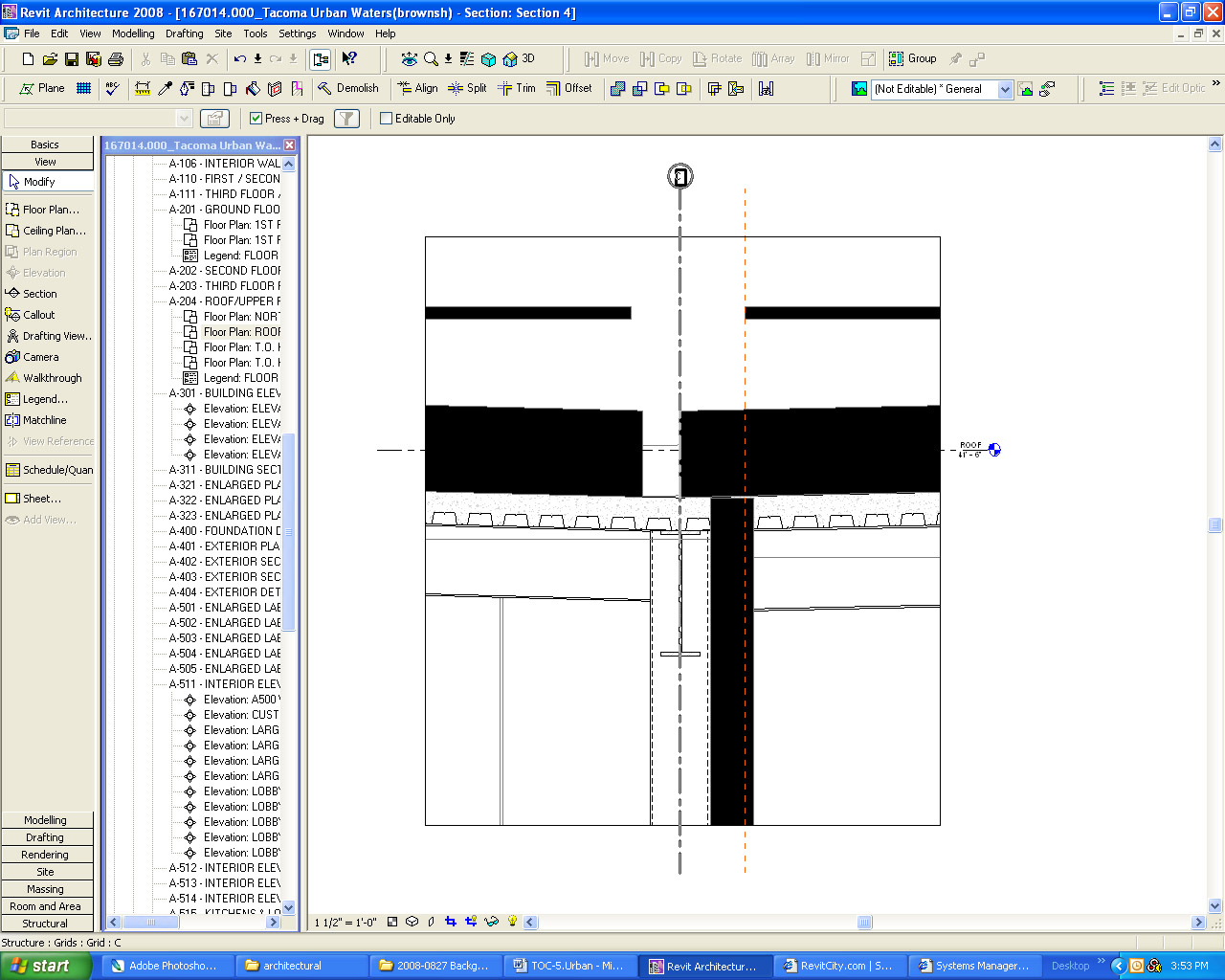
All of the new section cuts in our project suddenly started showing up with cut patterns solid black. It is walls,roofs, and anything that is cut (but not our linked structural model). The existing sections seem to be ok. I've tried changing the detail level and the drawing scale but it doesn't seem to make a difference. It is in every new section, not just one view, so I don't think graphic overrides are the issue. I'd love to hear if anyone has an idea. Thanks in advance.
|
This user is offline |
|
 | |
|
|
active
Joined: Thu, Sep 27, 2007
81 Posts
 |
Go into element properties of the object, edit the structure, and in there, there is a setting that says cut appearance. change this to whatever color, or hatch you want to show. by doing this it should apply it to all objects.
|
This user is offline |
|
|
|
active

Joined: Tue, Jan 16, 2007
1009 Posts
 |
Yeah it seems there could be a ton of variables to this issue, can you post some samples? Is it possibly a phasing issue?
|
This user is offline |
View Website
|
|
|
active
Joined: Tue, Aug 28, 2007
8 Posts
No Rating |
I've attached a screen shot of the problem section view. Don't know if that will help at all. We seem to have isolated it to the fact that only new sections cut from a particular floor plan have this problem. Thus, we're able to work around it by cutting it from a duplicate plan view of the same floor.
|
This user is offline |
|
|
|
active
Joined: Tue, Jan 16, 2007
1009 Posts
|
does this project have multiple phases? go to settings/phases/graphics overrides and there you can turn on the visibility of the patterns. or go into the view properties and change the phase filters.
Edited on: Wed, Aug 27, 2008 at 6:22:29 PM
|
This user is offline |
View Website
|
|
|
active
Joined: Tue, Aug 28, 2007
8 Posts
No Rating |
To fill you in on the resolution: the phase of the plan view was switched to Project Completion instead of New Construction. Once that was switched everything worked fine.
|
This user is offline |
|
|
|
active
Joined: Tue, Jan 16, 2007
1009 Posts
|
how did i know!  Sounds like you should do some QA on your model to insure your building elements are created in the correct phases.
|
This user is offline |
View Website
|
|
|
active
Joined: Thu, Jun 7, 2012
0 Posts
No Rating |
I had the same problem and fixed overriding a filter that was bugging.
|
This user is offline |
|
|
|
Similar Threads |
|
Fill Patterns |
Revit Building >> Technical Support
|
Mon, Mar 10, 2008 at 6:40:09 AM
|
1
|
|
Wall cut patterns |
Revit Building >> Technical Support
|
Fri, Jun 16, 2006 at 1:29:23 PM
|
1
|
|
cut pattern in section |
Revit Building >> Technical Support
|
Wed, Jun 1, 2011 at 4:30:59 AM
|
2
|
|
Perpsective Fill Patterns |
Revit Building >> Technical Support
|
Mon, May 10, 2010 at 6:12:50 PM
|
4
|
|
Halftone cut Patterns |
Revit Structure >> Tips & Tricks
|
Mon, Nov 19, 2012 at 4:05:25 PM
|
1
|
|
|
Site Stats
Members: | 2161655 | Objects: | 23325 | Forum Posts: | 152479 | Job Listings: | 3 |
|
 Search