|
|
|
Home | Forums |
Downloads | Gallery |
News & Articles | Resources |
Jobs | FAQ |
| Join |
Welcome !
|
9 Users Online (7 Members):
Show Users Online
- Most ever was 626 - Mon, Jan 12, 2015 at 2:00:17 PM |
Forums
|
Forums >> Revit Building >> Technical Support >> Ground line not consistent
|
|
|
active
Joined: Wed, Aug 24, 2005
11 Posts
No Rating |
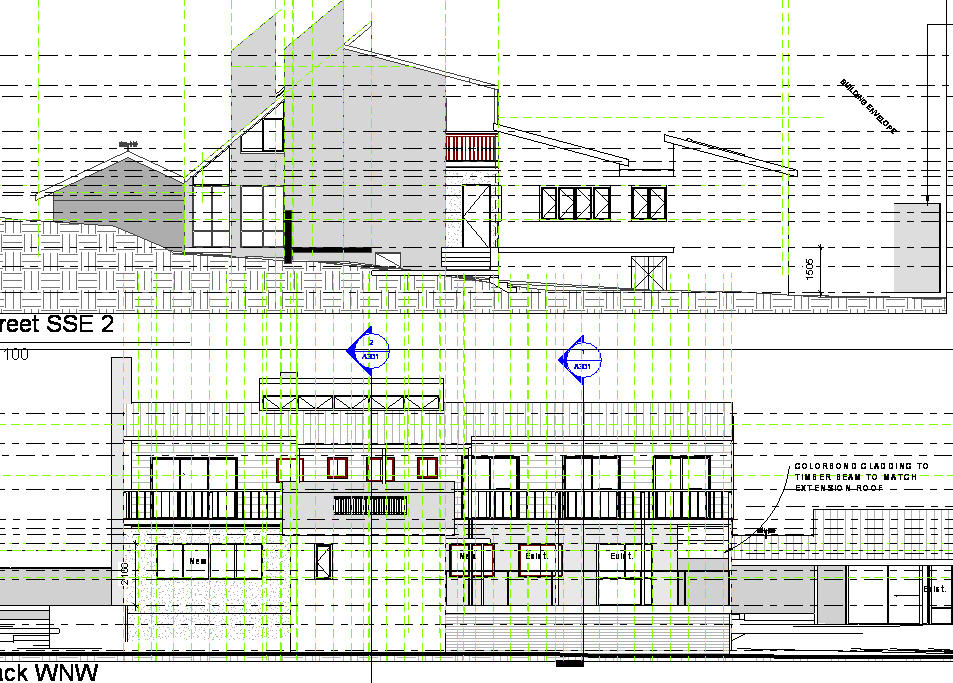
I am using Revit Architecture 2008. I want a thick ground line in all my elevation views, so I have gone: Settings> Object Styles> Model Objects tab> Topography> and set the lineweight cut to 8 (a thick line). The problem is the thick line only shows up in one elevation - see drawing (bottom elevation shows ground line, top elevation does not). Can anyone help me to make the ground line appear thick in all elevations?
|
This user is offline |
|
 | |
|
|
active

Joined: Thu, Dec 13, 2007
135 Posts
 |
The problem is most likely because your elevation lines don't cut the topo surface. Make sure your elevation line cuts the topo, and this should solve your problem. Also make sure you haven't got "thin lines" turned on.
-----------------------------------
- Core 2 Duo E8400 3ghz
- 756mb Nvidia 9600GSO 256bit
- 6gb Kingston RAM 800mz DDR2
- Windows XP Service Pack 3 32-bit
|
This user is offline |
|
|
|
Similar Threads |
|
Ground lines |
Revit Building >> Technical Support
|
Mon, Jun 13, 2011 at 1:32:56 PM
|
6
|
|
how to see upper levels dash lines at the ground floor? |
Revit Building >> Technical Support
|
Thu, Dec 24, 2009 at 2:26:32 AM
|
3
|
|
Changing line patterns and weight below the ground line |
Community >> Newbies
|
Mon, Apr 29, 2013 at 7:24:23 AM
|
1
|
|
Windows showing up gray in consistent colors view. |
Revit Building >> Technical Support
|
Tue, Apr 26, 2016 at 11:25:23 AM
|
13
|
|
Rendering Ground Planes showing up when i dont want them to |
Revit Building >> Technical Support
|
Wed, May 10, 2006 at 7:14:43 AM
|
5
|
|
|
Site Stats
Members: | 2161655 | Objects: | 23325 | Forum Posts: | 152479 | Job Listings: | 3 |
|
 Search