|
|
|
Home | Forums |
Downloads | Gallery |
News & Articles | Resources |
Jobs | FAQ |
| Join |
Welcome !
|
561 Users Online (12 Members):
Show Users Online
- Most ever was 3914 - Wed, Aug 26, 2026 at 4:53:14 AM |
Forums
|
Forums >> Revit Building >> Technical Support >> Subregion material inconsistencies
|
|
|
active

Joined: Mon, Oct 9, 2006
58 Posts
 |
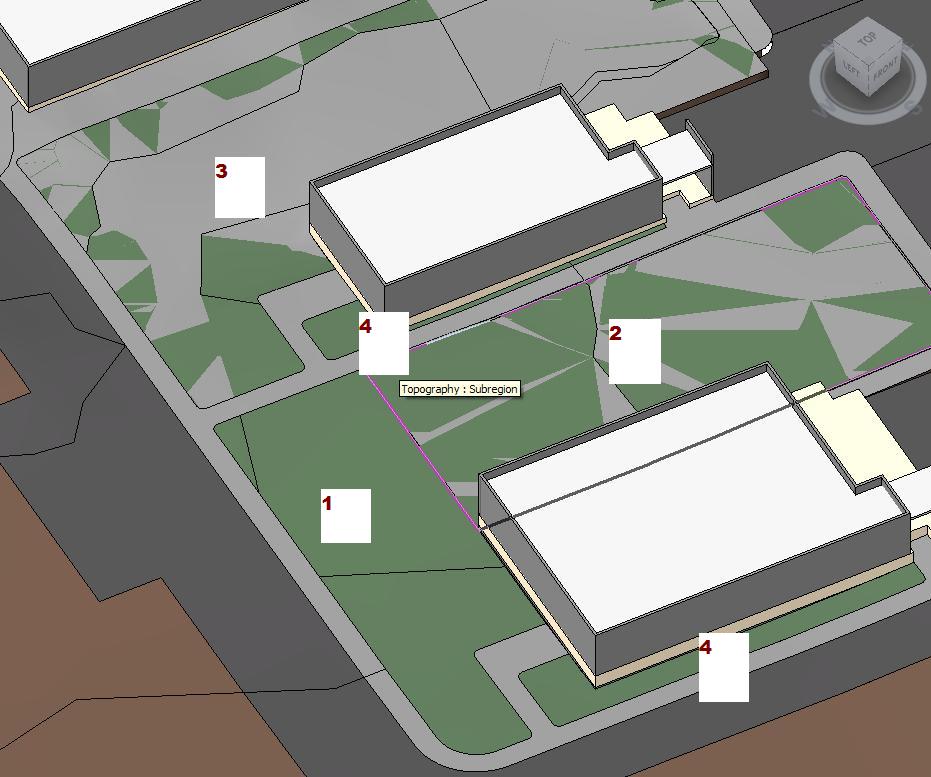
Hi all I use RA2009. Sometimes subregions do not get the color of the material purely you assign, but also has some parts of the material underneath (e.g. no 3, 2. I first made no 1 and 2 as one piece, at then it was massy like 3. Then i divide into two and 1 is ok but 2 is still the same, as seen on the image. No 4s are small and they are ok!?! So they should be small to be ok???). I doubt it is because i made the tarmacam subregion first and (without adding a subregion) i just select the island left in mid of tarmacam and changed the material to hardcore, and then added those grass subregions. But that might not be the reason right? Any ideas?
Edited on: Tue, Jul 1, 2008 at 10:01:53 AM
|
This user is offline |
|
 |
|
Similar Threads |
|
REVIT 2015 material takeoff, gross area issue |
General Discussion >> Revit Project Management
|
Wed, Sep 3, 2014 at 10:23:45 AM
|
11
|
|
subregion road in toposurface |
Revit Building >> Technical Support
|
Fri, Feb 22, 2013 at 8:26:36 AM
|
8
|
|
HOW TO SHOW SUBREGION OUTLINE ON FLOOR PLAN |
Revit Building >> Technical Support
|
Mon, Jul 11, 2011 at 7:32:06 PM
|
3
|
|
Unweildy subregion |
Revit Building >> Technical Support
|
Tue, Mar 28, 2006 at 4:19:07 PM
|
2
|
|
Property Lines and Toposurface Subregion Lines overlap |
Revit Building >> Technical Support
|
Wed, Dec 1, 2010 at 12:12:03 PM
|
0
|
|
|
Site Stats
Members: | 2187932 | Objects: | 23399 | Forum Posts: | 152454 | Job Listings: | 0 |
|
 Search