|
|
|
Home | Forums |
Downloads | Gallery |
News & Articles | Resources |
Jobs | FAQ |
| Join |
Welcome !
|
10 Users Online (8 Members):
Show Users Online
- Most ever was 626 - Mon, Jan 12, 2015 at 2:00:17 PM |
Forums
|
Forums >> Revit Building >> Technical Support >> KEY NOTE
|
|
|
Joined: Mon, Jan 5, 2004
4 Posts
No Rating |
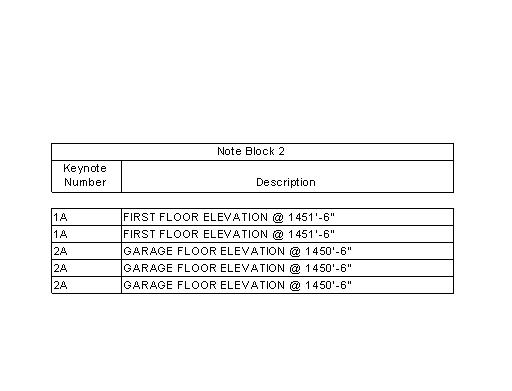
When I copy a keynote and keep the number the same it shows up twice in the keynote schedule. Is there anyway to have it list the keynote only once in the schedule even if the key note symbol is used in more than one place? Is there a way to filter out the repeat entries?
Thanks in advance
Todd
|
This user is offline |
|
 | |
|
|
active
Joined: Wed, Apr 14, 2004
6 Posts
No Rating |
Edit the schedule properties: On the sorting tab, at the bottom right, is a checkbox for "Itemize every instance". Turn it off if you don't want multiple listings of the same keynote numbers.
|
This user is offline |
|
|
|
Joined: Mon, Jan 5, 2004
4 Posts
No Rating |
Thanks Rob
I knew it was going to be some simple solution. I should of looked harder, thanks again for the responce.
|
This user is offline |
|
|
|
Similar Threads |
|
Key Notes Across Divisions. |
Revit Building >> Technical Support
|
Thu, Jan 27, 2011 at 10:07:01 AM
|
1
|
|
KEY NOTE ABBREVIATION |
Revit Building >> Technical Support
|
Thu, Jun 2, 2005 at 6:07:46 PM
|
1
|
|
key note and schedule font |
Revit Building >> Technical Support
|
Tue, Oct 26, 2010 at 11:42:31 AM
|
2
|
|
Revit 2015 - Filter Note Block Keynotes by Those Visible on a Sheet |
Revit Building >> Technical Support
|
Sun, Mar 4, 2018 at 2:08:58 PM
|
2
|
|
keyed note question. (thanks for all of the help, by the way) |
Revit Structure >> Technical Support
|
Thu, Feb 14, 2008 at 10:15:00 AM
|
2
|
|
|
Site Stats
Members: | 2161655 | Objects: | 23325 | Forum Posts: | 152479 | Job Listings: | 3 |
|
 Search