|
|
|
Home | Forums |
Downloads | Gallery |
News & Articles | Resources |
Jobs | FAQ |
| Join |
Welcome !
|
852 Users Online (76 Members):
Show Users Online
- Most ever was 3914 - Wed, Aug 26, 2026 at 4:53:14 AM |
Forums
|
Forums >> Revit Building >> Technical Support >> Problems with Curved Walls and Masses
|
|
|
active
Joined: Mon, Oct 8, 2007
57 Posts
 |
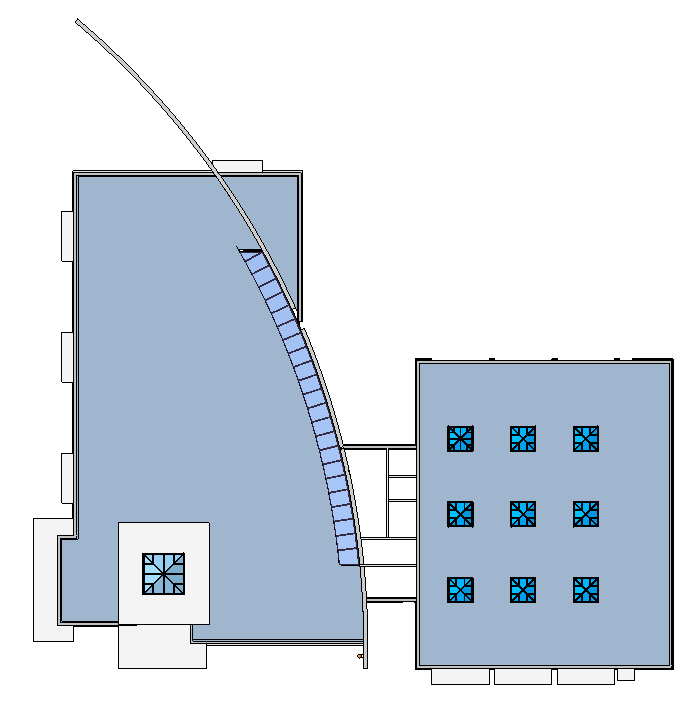
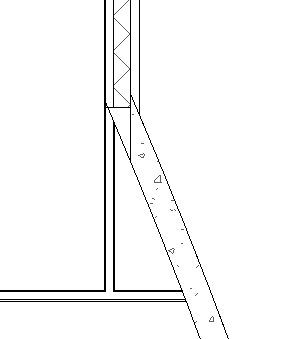
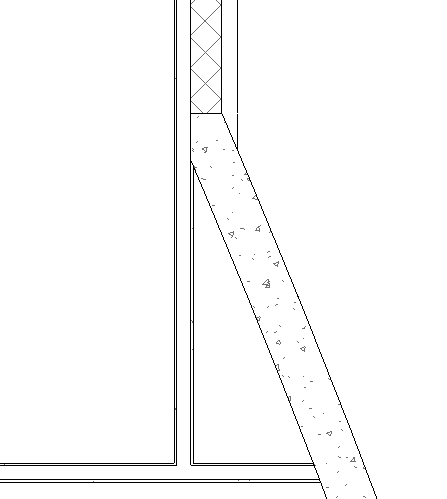
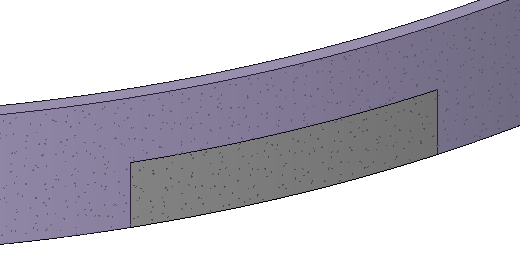
I'm working on a project that has a curved wall running through it, and I've ran into a few issues with it. The first picture is an ariel view to give you an idea of the curved wall. In the areas where it's going to be cutting through the building, we want openings in the wall. First, is there a way to cut the end of a wall at a specific angle instead of perpendicular to the surface? Second, I'm having a real problem with wall joins. The second picture is one of the wall joins I'm getting stuck with, and the third is a picture of what it's supposed to look like. I'm willing to settle for something less than that, but I'd like it as close as possible. Third, my first thought when starting this project was to apply a wall to the face of a curved mass and place voids in the mass where I want openings, but as you can see in the fourth picture, it's not working as I'd like it to. Any ideas? Any help on any of these issues would be great. Thanks.
|
This user is offline |
|
 | |
|
|
active
Joined: Thu, Aug 16, 2007
34 Posts
 |
Maybe creating an in-place void family (wall family) for the angled cut...make sure to cut the void geometry from the host wall and not from the mass before finishing the family. Haven't encountered the wall joins problem yet. Maybe try right-clicking the joint (blue dot upon clicking the wall and hovering on the joint) and choose "disallow join" from the drop-down menu. Or maybe try using in-place voids. HTH
|
This user is offline |
|
|
|
Similar Threads |
|
Mass Schedule Subtotals for Large Project |
Revit Building >> Technical Support
|
Thu, Feb 22, 2007 at 10:58:34 AM
|
1
|
|
Void Masses |
Revit Building >> Technical Support
|
Fri, Oct 3, 2008 at 4:11:06 PM
|
9
|
|
Massing with regards to complexity |
Workflow & Implementation >> Training
|
Mon, Apr 20, 2009 at 6:21:05 PM
|
3
|
|
My LItle Novice Review, on Set-Up, Modelling, Rendering, Topography, etc. |
Community >> Newbies
|
Wed, Mar 28, 2012 at 4:45:42 AM
|
6
|
|
Masses Don't Print?!? |
Community >> Newbies
|
Thu, Feb 24, 2011 at 2:47:51 PM
|
2
|
|
|
Site Stats
Members: | 2189245 | Objects: | 23399 | Forum Posts: | 152445 | Job Listings: | 0 |
|
 Search