|
Forums >> Revit Building >> Technical Support >> Can you darken every 5' contour line?
|
|
|
active

Joined: Wed, Aug 29, 2007
417 Posts
 |
Is there anyway to do this in the topography? Linework doesn't work. Thanks, Lorne
-----------------------------------
AutoDesk Revit Certified Professional
Denver, CO
Revit Architecture |
This user is offline |
|
 |
|
|
|
site moderator|||
Joined: Tue, May 16, 2006
13079 Posts
|
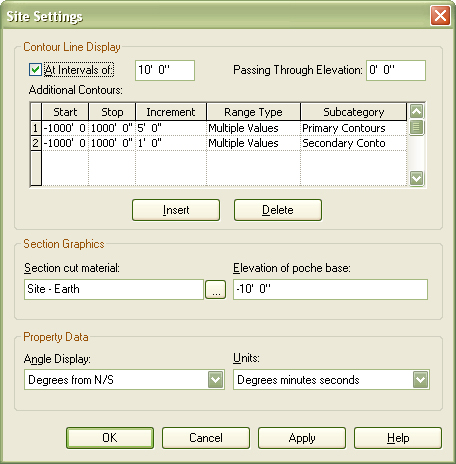
Yes, you can First, set the lineweight you want for primary and secondary contours under settings / object styles / topography Now, under settings / site settings, you need two contour settings - 1 at 1' increment using the secondary contour lines and one at 5' intervals using the primary contour lines .... (or whichever way you have them configured / named)
|
This user is offline |
|
|
|
active
Joined: Wed, Aug 29, 2007
417 Posts
|
Ok that all makes sense. But it is still not showing up when I set the settings accurately? Why not? What am I missing? Do I need to mess with anything along the top? 'At Intervals of:' Or passing through elevation? Thanks, Lorne
Edited on: Mon, Feb 25, 2008 at 3:51:47 PM
-----------------------------------
AutoDesk Revit Certified Professional
Denver, CO
Revit Architecture |
This user is offline |
|
|
|
site moderator|||
Joined: Tue, May 16, 2006
13079 Posts
|
I've used this so I know it works. On your site settings, do you have the start and stop set large enough to include your contour range? Also, lineweights are hard to see on a site plan because of the scale. Zoom in on the lines.
|
This user is offline |
|
|
|
active
Joined: Wed, Aug 29, 2007
417 Posts
|
Yes i have my range set to -1000' to +1000'. My contours are sitting around +- 0'. I zoomed in, and still nothing. The image I just posted is my current site settings, and they seem to look exactly as you're saying. But, still no changes. Maybe there's something wrong with this file? Why does Revit work only half the time, it's really frusterating! Anyways, any other ideas? Thanks, Lorne
-----------------------------------
AutoDesk Revit Certified Professional
Denver, CO
Revit Architecture |
This user is offline |
|
|
|
active
Joined: Wed, Aug 29, 2007
417 Posts
|
Well, I'm a fool. I had a graphic override per view. I reset it and changed the object overrides. Now it works. WWHub you always are the best help! Thanks
-----------------------------------
AutoDesk Revit Certified Professional
Denver, CO
Revit Architecture |
This user is offline |
|
|
|
site moderator|||
Joined: Tue, May 16, 2006
13079 Posts
|
Did you also set your lineweight you want for primary and secondary contours under settings / object styles / topography? My settings are 1 for secondary and 6 for primary. You might make that spread even larger until you are assured that it works.
|
This user is offline |
|
|
|
active
Joined: Wed, Aug 29, 2007
417 Posts
|
Yes I did. It's working fine. I don't need to change that spread. Looks great. Thanks again. Lorne
-----------------------------------
AutoDesk Revit Certified Professional
Denver, CO
Revit Architecture |
This user is offline |
|
|
|
active
Joined: Sat, Feb 7, 2009
8 Posts
 |
This was frustating for me too. I've adjusted everything per your conversation and still no results.
The last thing to check was the "view range" if this is too big it doesn't work either
|
This user is offline |
|
|
|
Similar Threads |
|
Possible to place contour lines to toposurface instead of points? |
Revit Building >> Technical Support
|
Fri, Jun 1, 2018 at 2:57:52 PM
|
7
|
|
Hide 'Contour' Lines in Modified Sub Element |
Revit Building >> Technical Support
|
Tue, Dec 3, 2013 at 9:21:03 AM
|
3
|
|
Site-contour |
Revit Building >> Technical Support
|
Wed, Aug 23, 2006 at 5:57:17 AM
|
0
|
|
A Whole Lot of TOPOGRAPHY & CONTOUR LINE questions... |
Revit Building >> Technical Support
|
Tue, Nov 22, 2011 at 6:07:37 AM
|
9
|
|
Linking AutoCAD Site Contour missing 2014 |
Revit Building >> Technical Support
|
Wed, May 27, 2015 at 7:56:32 AM
|
4
|
|

 Search