|
Forums >> Community >> Newbies >> Rendereing
|
|
|
active
Joined: Mon, Jan 9, 2012
38 Posts
 |
Thah is exactly what I' ve been doing...Carpet shouldnt be glossy...I played with wood, concrete etcetc..Vry frustrating, since the perfect rendering came out nice.
|
This user is offline |
|
 |
|
|
|
active

Joined: Thu, May 28, 2009
829 Posts
 |
AHHA.
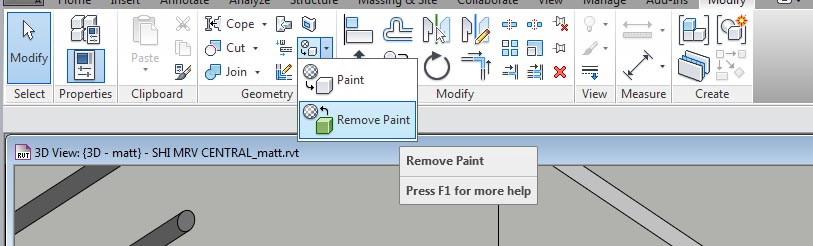
Paint. Is it painted? Use the remove paint tool!
|
This user is offline |
|
|
|
active
Joined: Mon, Jan 9, 2012
38 Posts
|
Hold on, what paint do you mean? Under my "materials"?
|
This user is offline |
|
|
|
active
Joined: Thu, May 28, 2009
829 Posts
|
There's a "paint" tool under the modify tab. If a surface is painted, it will override any changes that are made to the underlying materials.
It can be a real pain in the curse to figure out sometimes. But if you don't remember painting it... maybe that's not the answer. But I would wager it is. There's a little dropdown arrow on on the paint icon, that allows you to use the "remove paint" tool.
It's in the modify tab, geometry box, the checkered circle icon pointing at a cube.
|
This user is offline |
|
|
|
active
Joined: Mon, Jan 9, 2012
38 Posts
|
Do i need to go to the main menu and go under 'Modify"/ Or you are talking about the properties box?
|
This user is offline |
|
|
|
active
Joined: Thu, May 28, 2009
829 Posts
|
On the main menu. Nothing selected, nothing being edited. It's one of the general tools up there with "edit wall joins" "cut geometry", etc.
Find the remove paint tool, and then see if the floor highlights when you hover over it. If it does--then click to remove any paint.
Paint is used to override materials on ANY face. It is a very dangerous tool--because there is no way to mass-unpaint. I had a former coworker paint literally hundreds of surfaces in a project one night--he stayed there until midnight to do it. I didn't realize what he'd done until backups got overridden... it took me days to track down all of the surfaces that had been overridden.
|
This user is offline |
|
|
|
active
Joined: Mon, Jan 9, 2012
38 Posts
|
Do i need to go to the main menu and go under 'Modify"/ Or you are talking about the properties box?
|
This user is offline |
|
|
|
active
Joined: Thu, May 28, 2009
829 Posts
|
main menu. not properties.
Edited on: Mon, May 21, 2012 at 5:14:07 PM
|
This user is offline |
|
|
|
active
Joined: Mon, Jan 9, 2012
38 Posts
|
Took the paint off...same thing, the reflection is still there. It looks just like water ...instead of the carpet I get a mirror reflection of walls and windows...  glitch? Maybe i can send you teh file or I dont know if this is legal here on RC. glitch? Maybe i can send you teh file or I dont know if this is legal here on RC.
|
This user is offline |
|
|
|
active
Joined: Thu, May 28, 2009
829 Posts
|
If it's a very small project file, you might be able to post it. If it's 10-12MB, send it to itsmyalterego@gmail.com and I'll take a quick look at it. Now I'm pretty curious what's going on.
|
This user is offline |
|
|
|
|
|
active
Joined: Mon, Jan 9, 2012
38 Posts
|
I will send it. It's large, two story building. mainly in CAD, Im just learning REVIT using this project.
|
This user is offline |
|
|
|
active
Joined: Mon, Jan 9, 2012
38 Posts
|
sent. let me know if you got it !
|
This user is offline |
|
|
|
active
Joined: Thu, May 28, 2009
829 Posts
|
Got it.
It's the Topography. the topography is perfectly flush with the floor level, so although you have everything set perfectly with your floor (non-glossy, correct wood material, etc) -- the topo is also trying to render. And guess what! It's set to 100% reflective mirror. Defauting to the material "$1163_Barracks\wood01" Change the topo to "Site - Earth", and... either drop it all down an inch or two, or split the surface to cut the building footprint out of the topo.
If you're mostly interested in renders, leaving the topo surface burried an inch or two within the floor is a quick and easy solution.
PS. Nice bookcases 
Edited on: Mon, May 21, 2012 at 6:47:33 PM
|
This user is offline |
|
|
|
active
Joined: Mon, Jan 9, 2012
38 Posts
|
Thanks, I will try to do what you suggest and will let you know ! 
|
This user is offline |
|
|
|
active
Joined: Mon, Jan 9, 2012
38 Posts
|
I did changed the topo to site-earth, but dont know how to do the rest, can you show me the window I plug those number in?
|
This user is offline |
|
|
|

 Search